

Legacy IAM is identity infrastructure built for on-prem apps and stable workforces. It still authenticates users, but it breaks down when you need consistent policy enforcement across SaaS, APIs, partners, and multi-cloud. The result is predictable: slower joiner-mover-leaver workflows, more orphaned access, and higher audit effort.
The fastest way to recognize legacy idenityty platform is to look for identity workflows that depend on manual tickets, custom scripts, and brittle connectors rather than policy-driven automation.
What is Legacy IAM?
Legacy IAM is a set of IAM systems and processes that rely on older identity architectures, typically centered on an on‑prem directory, static credentials, and application-by-application integration. Outdated identity management platforms are usually optimized for internal workforce access to a limited number of enterprise applications. That original design becomes a constraint when identity must cover external users, multi-cloud environments, and continuous change.
That constraint becomes easier to see when you list what a legacy access control system typically contains.
What does a legacy IAM platform typically include?
A legacy IAM platform typically includes a directory service, basic authentication, and a collection of point integrations that connect applications to the directory. Legacy user provisioning platforms commonly include:
- Directory services and group models used as the main access control mechanism.
- Federation based on older patterns and app-by-app configuration.
- Provisioning workflows implemented as tickets, scripts, or batch jobs.
- Access reviews and audits that depend on manual evidence collection.
In many enterprises, “legacy IAM” is not one product- it’s a mix of access management (authentication and SSO), IGA (provisioning, joiner-mover-leaver), and governance (reviews and audit) stitched together with tickets and scripts.
These components can work, but the next question is whether they match today’s operating model.
How Legacy IAM different from modern IAM?
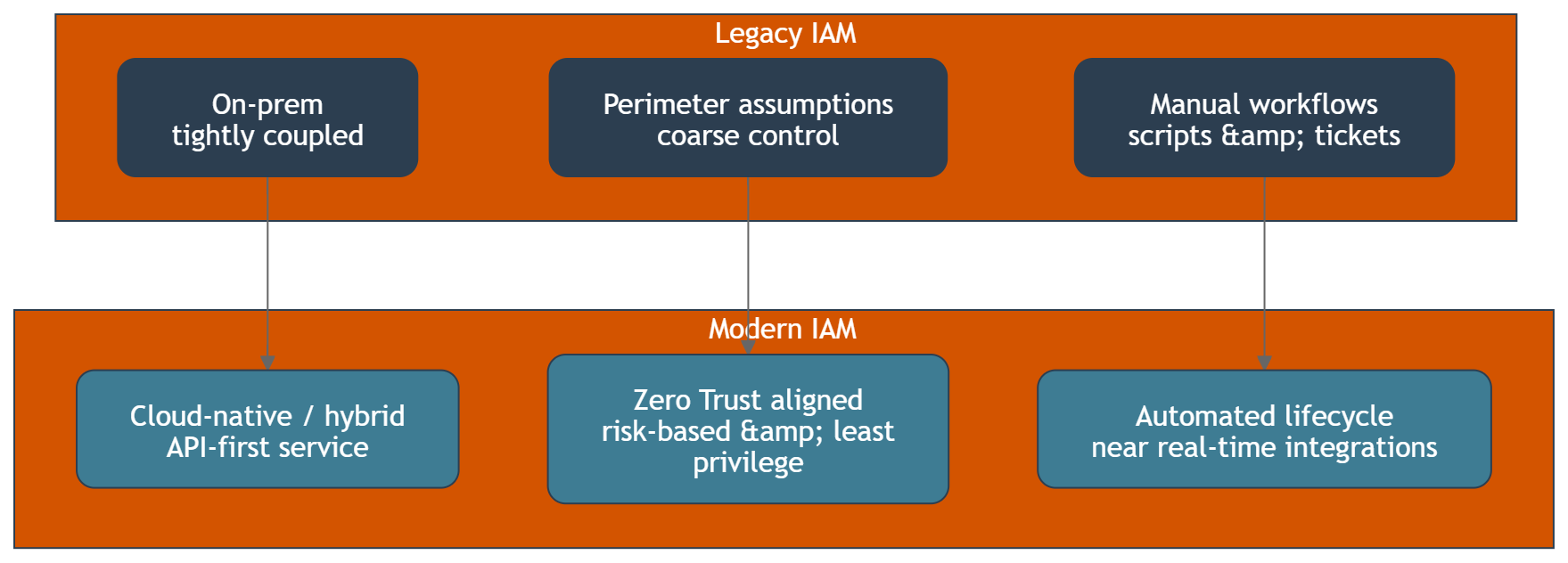
Legacy IAM is built around static trust assumptions, while modern IAM is built around continuous verification and policy enforcement across many identity domains, addressing potential breaches. In practice, the differences show up in three areas.
| Area | Legacy IAM | Modern IAM |
|---|---|---|
| Architecture | On‑prem, tightly coupled to directory and applications | Cloud-native or hybrid, API-first, identity as a shared service |
| Security model | Perimeter-based assumptions, coarse-grained control | Zero Trust alignment, risk-based control, least privilege by default |
| Operating model | Manual workflows, scripts, slow change | Automated lifecycle, near real-time integrations, consistent policy |
This gap between operating models leads directly to limitations of outdated IAM platforms, impacting overall identity security.
What limitations do legacy IAM platforms create in enterprise environments?
The limitations of legacy IAM platforms are mainly about scale, consistency, and speed of change, which can lead to potential vulnerabilities. Traditional identity management system often struggles with:
- Policy inconsistency: each application becomes a separate enforcement point.
- Integration bottlenecks: every new system requires a custom connector or a specialist change.
- Identity data fragmentation: accounts and entitlements drift across systems.
- Slow lifecycle execution: onboarding, offboarding, and role changes take too long.
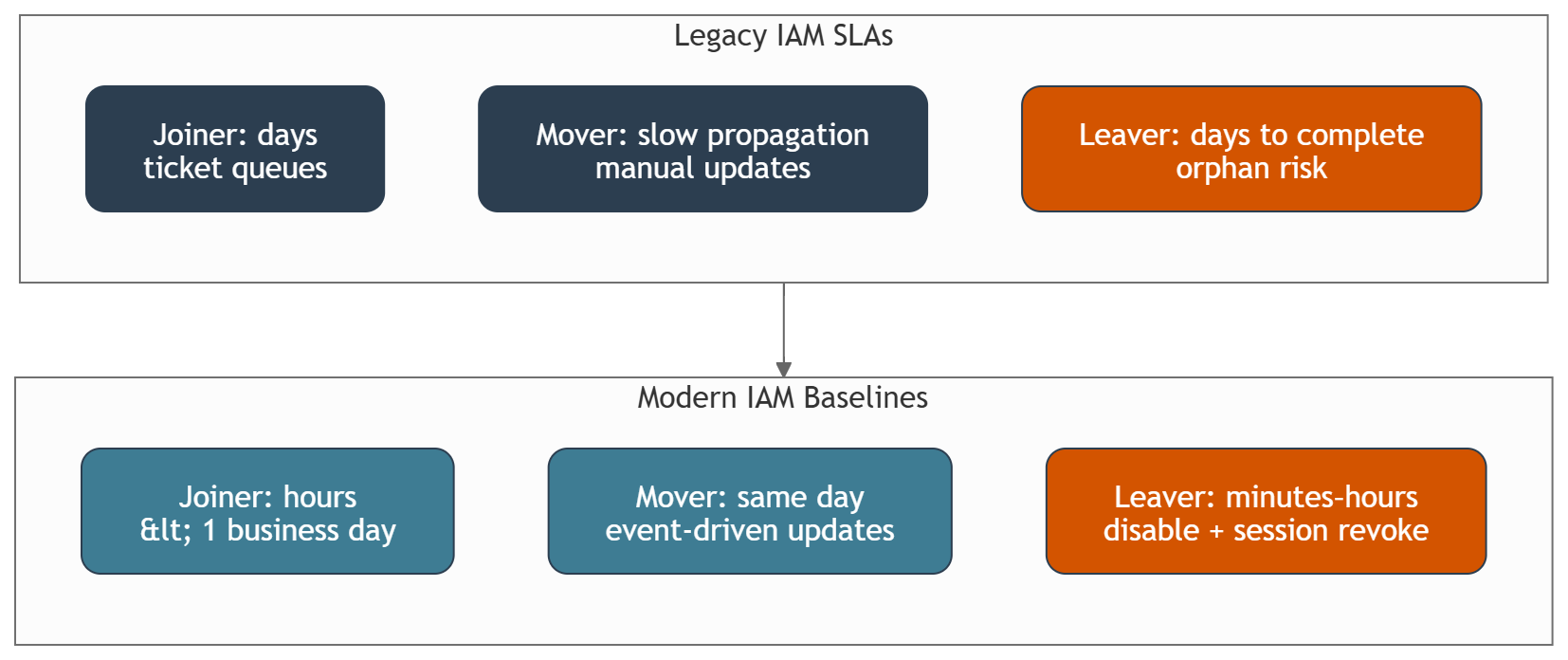
In practice, lifecycle speed becomes measurable: joiner access should be provisioned within hours (or <1 business day), and mover changes should propagate same day – outdated workflows often miss those baselines.
When these limitations stack up, architects start asking what capabilities are missing in legacy access control systems.
What capabilities are missing in legacy IAM platforms today?
What capabilities are missing in legacy IAM platforms is usually visible when you try to implement modern security and user experience requirements. Common missing or weak capabilities include:
- Central policy decisioning across web apps, APIs, and legacy apps.
- Strong authentication patterns such as adaptive MFA and passwordless user journeys.
- Real-time event-driven automation for lifecycle and access changes.
- Unified visibility across identities, entitlements, and access paths.
- Safer integration patterns for partners, contractors, and machine identities.
Missing capabilities create direct security and compliance pressure, which is why risk is the next logical lens.
What risks does Legacy IAM introduce for security and compliance?
Legacy IAM introduces risk when it cannot keep access controls aligned with reality. A common pattern is accounts that remain active in SaaS or VPN days after termination because deprovisioning depends on tickets and app-by-app steps. The most common risk patterns are orphaned accounts, over-privileged access, inconsistent enforcement, and slow offboarding. Those gaps increase exposure to credential theft and make it harder to contain lateral movement after a compromised account.
On the compliance side, outdated IAM system often makes evidence harder to produce because the audit trail is spread across tickets, scripts, and application logs rather than a unified control plane. That is why security teams experience Legacy IAM as recurring audit effort, not a one-time remediation.
Security and compliance pressure is tightly linked to how identity workflows affect user experience.
How does Legacy IAM affect user experience and productivity?
Legacy IAM affects user experience by making authentication and access requests feel inconsistent across systems. Users see repeated logins, unpredictable multi-factor prompts, and long wait times for access approvals, which can result in a frustrating user behavior experience. IT teams see more password resets, more exception handling, and more time spent coordinating changes.
This friction becomes a measurable cost driver, which leads to a common budget question.
What is the legacy IAM replacement cost, and what drives it?
Legacy identity system replacement cost is rarely only a license line item. The main cost drivers are integration work, re-implementing authentication and authorization patterns, redesigning workflows, and operating two systems during transition.
Typical drivers that increase legacy access control replacement cost include:
- Number of integrated applications and integration patterns in use.
- Depth of customization in the outdated IAM system.
- Volume of identity types: workforce, partners, customers, contractors, and services.
- Compliance requirements that force parallel controls during cutover.
- Skill availability for identity engineering and platform operations.
Cost becomes easier to justify when stakeholders understand the benefits of moving beyond outdated iam system.
What are the benefits of moving beyond Legacy IAM?
The benefits of moving beyond legacy IAM are a capability uplift across security posture, delivery speed, and governance quality. Organizations typically pursue modernization to:
- Reduce security gaps created by fragmented identity systems.
- Enforce consistent access controls and least privilege across environments.
- Improve user experience with better sign-in and fewer friction points.
- Increase automation across onboarding, offboarding, and entitlement changes.
- Shorten time-to-integrate new applications and partners.
Those benefits are easier to validate when you can diagnose whether you truly have Legacy IAM.
How can architects and security managers tell they are running Legacy IAM?
Architects and security managers can usually confirm Legacy IAM by checking how access policies are enforced and how lifecycle workflows execute. Common signals include:
- Access reviews require spreadsheet exports and manual reconciliation.
- Deprovisioning is not consistently completed within a defined SLA.
- Each application has its own exceptions for authentication and authorization.
- Identity data is not a reliable source of truth across teams.
- Security incidents repeatedly involve account hygiene and stale entitlements.
A practical indicator is offboarding SLA: in legacy setups, full deprovisioning often takes days, while a modern baseline aims for session revocation and account disablement within minutes to a few hours.
Once you see these signals, the next step is to align on what “moving beyond legacy IAM” should mean in terms of modernizing identity security, before any migration plan is discussed.
What should “moving beyond Legacy IAM” mean before any migration conversation begins?
Moving beyond Legacy IAM should mean defining the target capabilities and operating model, not choosing a product first. A good definition focuses on:
- A shared enterprise IAM platform boundary and ownership model.
- A consistent authentication standard across applications and identity types.
- A policy model that can be enforced across web apps, APIs, and legacy systems.
- A measurable lifecycle workflow baseline for joiner, mover, and leaver processes.
With this definition, teams can talk about modernization without turning the discussion into a vendor debate.
Inteca provides IAM modernization services for regulated enterprises, with a focus on building and operating resilient IAM platforms and modern authentication patterns.
Overview and capability scope are available on this page https://inteca.com/iam-modernization/
See Inteca’s approach to IAM modernization projects
FAQ