

What is SAML? Definition of Security Assertion Markup Language
SAML is Security Assertion Markup Language, an XML-based open standard that lets an identity provider send authentication information to a service provider. SAML authentication is used mainly for federated identity and enterprise single sign-on. The standard lets users access applications without storing a separate password in every application.
SAML 1.0 was introduced in 2002, but SAML 2.0 became the dominant version after 2005. SAML 2.0 combined earlier SAML, Liberty Alliance, and Shibboleth work into the version still used by enterprise SaaS, internal portals, and identity platforms. Most modern references to SAML mean SAML 2.0.
Is SAML authentication or authorization?
SAML is primarily an authentication protocol because it proves that a user has been authenticated by a trusted identity provider. A SAML assertion can also carry roles, groups, and authorization decisions, but those fields support access control rather than define the main purpose of SAML. The service provider still decides what the authenticated user can do.
This distinction matters for developers and IT engineers implementing SAML authentication. Authentication answers who the user is. Authorization answers what that user can access. A SAML response can contain both kinds of information, but the login trust model starts with authentication and then leads into authorization policy.
What is SAML used for in enterprise systems?
SAML is used for enterprise SSO, federated identity, partner access, and SaaS login integration. A company can authenticate employees in one identity provider and then give them access to Salesforce, AWS, Slack, GitHub Enterprise, or internal applications. This reduces password sprawl and centralizes access policy.
SAML is especially common in browser-based enterprise applications that need workforce identity integration. It is less common for mobile-native apps, public REST APIs, and microservice-to-microservice authorization, where OpenID Connect and OAuth 2.0 usually fit better. That boundary leads directly to the three parties in a SAML exchange.
Who are the three parties in SAML authentication?
The three parties in SAML authentication are the user, the identity provider, and the service provider. The user requests access, the identity provider authenticates the user, and the service provider consumes the SAML response. This trust triangle is the core of the SAML protocol explained in practical terms.
The user, also called the principal, is the person who wants to access an application. The identity provider, or IdP, is the system that authenticates the user and issues the SAML response. The service provider, or SP, is the application that trusts the IdP and grants access after validating the assertion.
What does the SAML identity provider do?
The SAML identity provider authenticates the user and creates a signed SAML response for the service provider. Common SAML IdPs include Okta, Microsoft Entra ID, Google Workspace, Ping Identity, OneLogin, and Keycloak. The IdP owns the login session, credentials, MFA policy, and identity attributes.
An IdP is part of a broader federated identity model. In that model, the service provider does not need to verify the password directly. It relies on a trust relationship, metadata, certificates, and signed XML messages from the IdP.
What does the SAML service provider do?
The SAML service provider protects the application and validates the SAML response before creating an application session. Examples of service providers include Salesforce, AWS, Slack, Atlassian, GitHub Enterprise, and custom business systems. The SP decides whether the assertion is valid for the requested resource.
The service provider must validate the issuer, audience, signature, time window, destination, and subject confirmation data. Weak SP validation creates security risk even when the IdP is correctly configured. This is why SAML authentication is not only an identity configuration task but also an application security task.
What role does the browser play in SAML login?
The browser transports SAML messages between the service provider and the identity provider during a web login flow. In the common HTTP POST binding, the browser submits a signed SAML response from the IdP to the SP. The browser does not validate the assertion; it only carries protocol messages.
This browser-mediated design makes SAML practical for enterprise web SSO. It also means that redirects, cookies, form posts, and TLS configuration are operationally important. The next section shows how those pieces work step by step.
How does SAML authentication work step by step?
SAML authentication works by redirecting the user from a service provider to an identity provider, authenticating the user, and returning a signed SAML response to the service provider. The service provider validates the response and creates a local application session. This flow is most often SP-initiated.
The SP-initiated flow is common because the user usually starts by opening the application. The application detects that the user has no session and sends the browser to the IdP with an AuthnRequest. After authentication, the IdP returns a SAML response that the SP can validate.
How SAML works
SP-initiated SSO — step-by-step flow
Click any step to see what happens at each stage of the SAML authentication sequence.
An employee navigates to a protected application (e.g. Salesforce). The application finds no active session — the user is not yet authenticated.
The browser issues an HTTP GET request to the Service Provider. The SP checks for a session, finds no valid token, and triggers the SAML flow.
The Service Provider creates a signed SAML AuthnRequest and returns an HTTP 302 redirect to the IdP. The AuthnRequest includes the EntityID, ACS URL, and RelayState.
The browser forwards the AuthnRequest to the Identity Provider (e.g. Keycloak). The IdP checks for an existing SSO session — if none is found, it presents a login form.
The Identity Provider verifies the user’s identity — this may be username/password, MFA, or an existing IdP session. On success, it creates a signed SAML response.
The IdP redirects the browser with a Base64-encoded signed SAML response. The response contains an assertion with user attributes (email, groups, roles) and time conditions: NotBefore and NotOnOrAfter.
The browser automatically submits an HTTP POST form with the SAMLResponse parameter to the Service Provider’s Assertion Consumer Service (ACS) endpoint. This is the only step where identity data passes through the browser.
The Service Provider verifies: the XML signature (certificate from IdP metadata), Issuer, Audience (SP EntityID), Destination (ACS URL), expiry (NotOnOrAfter), and InResponseTo (replay attack protection). An application session is created only after successful validation.
The Service Provider issues its own session cookie and redirects the browser to the originally requested resource. The user sees the application without entering a password — SSO complete.
Need help implementing SAML SSO? Inteca designs and implements IAM architectures with Keycloak, SAML 2.0, and OpenID Connect.
Get in touchWhat is the SP-initiated SAML authentication flow?
The SP-initiated SAML authentication flow starts when a user opens a protected application before having a valid session. The service provider creates a SAML AuthnRequest and redirects the browser to the identity provider. The identity provider then authenticates the user or reuses an existing IdP session.
The practical SP-initiated SAML authentication flow usually follows these steps:
-
The user opens a service provider such as Salesforce.
-
The service provider generates a SAML AuthnRequest.
-
The browser redirects the user to the identity provider.
-
The identity provider authenticates the user with password, MFA, passkey, or an existing session.
-
The identity provider creates a signed SAML response containing a SAML assertion.
-
The browser posts the SAML response to the service provider assertion consumer service endpoint.
-
The service provider validates the signature, issuer, audience, time window, and destination.
-
The service provider creates an application session and grants access.
What is the IdP-initiated SAML authentication flow?
The IdP-initiated SAML authentication flow starts when a user opens an application tile in the identity provider portal. The IdP creates a SAML response and sends it to the service provider without first receiving an AuthnRequest. This pattern is convenient for employee portals and app launchpads.
IdP-initiated SAML is simpler for users but gives the SP less request context. Some security teams prefer SP-initiated SAML because the SP can include request identifiers, relay state, and destination context. Both flows require strict validation of signed responses and time conditions.
What does a SAML authentication diagram look like?
A SAML authentication diagram shows the user, browser, service provider, and identity provider exchanging redirects, requests, responses, and sessions. The diagram below represents the SP-initiated flow because it is the most common enterprise SSO pattern. It can be converted into a visual asset for publication.
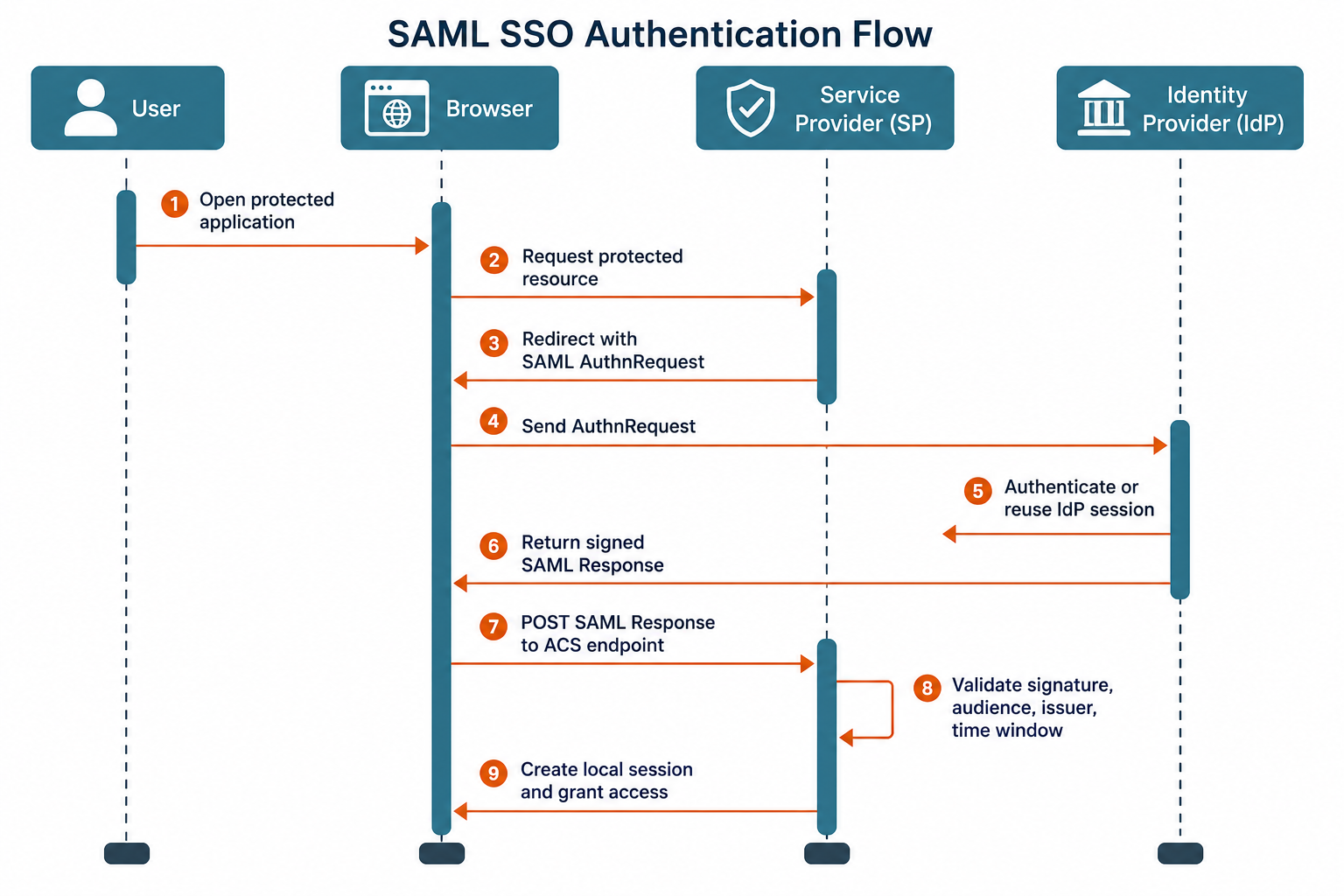
Teams implementing SAML SSO should document both the logical flow and the exact endpoints used in production. Keycloak can act as a SAML 2.0 identity provider or broker, which makes it useful for organizations implementing SAML SSO across legacy and modern applications.
What is a SAML assertion?
A SAML assertion is a signed XML document containing identity statements about a user. The assertion is carried inside a SAML response from the identity provider to the service provider. The service provider reads the assertion to establish who the user is and which attributes were asserted.
SAML assertions are powerful because they package identity, session, and attribute data in a machine-readable format. A typical assertion contains an issuer, subject, conditions, authentication statement, attribute statement, and signature. The signature is the trust anchor that prevents tampering when validation is implemented correctly.
What are the three types of SAML assertions?
The three types of SAML assertions are authentication assertions, attribute assertions, and authorization decision assertions. Authentication assertions state that the user authenticated at a certain time with a certain method. Attribute assertions provide values such as email, department, role, employee ID, or group membership.
Authorization decision assertions state whether the subject is allowed to access a resource. In practice, many enterprise SAML deployments rely mainly on authentication and attribute statements, while application-specific authorization remains inside the service provider. This reduces coupling between the IdP and application business logic.
What does a SAML assertion XML example look like?
A SAML assertion XML example shows the structure that carries the user identity from the identity provider to the service provider. The example below is simplified for readability and should not be copied as a production template. Real assertions include namespaces, certificates, canonicalization, and full XML signatures.
<saml:Assertion

    xmlns:saml="urn:oasis:names:tc:SAML:2.0:assertion"

    ID="_example-assertion-id"

    IssueInstant="2026-06-19T14:00:00Z"

    Version="2.0">

  <saml:Issuer>https://idp.example.com/saml</saml:Issuer>

  <saml:Subject>

    <saml:NameID Format="urn:oasis:names:tc:SAML:1.1:nameid-format:emailAddress">

      alice@example.com

    </saml:NameID>

    <saml:SubjectConfirmation Method="urn:oasis:names:tc:SAML:2.0:cm:bearer">

      <saml:SubjectConfirmationData

          Recipient="https://sp.example.com/saml/acs"

          NotOnOrAfter="2026-06-19T14:05:00Z" />

    </saml:SubjectConfirmation>

  </saml:Subject>

  <saml:Conditions NotBefore="2026-06-19T14:00:00Z" NotOnOrAfter="2026-06-19T14:05:00Z">

    <saml:AudienceRestriction>

      <saml:Audience>https://sp.example.com/saml/metadata</saml:Audience>

    </saml:AudienceRestriction>

  </saml:Conditions>

  <saml:AuthnStatement AuthnInstant="2026-06-19T13:59:30Z">

    <saml:AuthnContext>

      <saml:AuthnContextClassRef>

        urn:oasis:names:tc:SAML:2.0:ac:classes:PasswordProtectedTransport

      </saml:AuthnContextClassRef>

    </saml:AuthnContext>

  </saml:AuthnStatement>

  <saml:AttributeStatement>

    <saml:Attribute Name="email">

      <saml:AttributeValue>alice@example.com</saml:AttributeValue>

    </saml:Attribute>

    <saml:Attribute Name="department">

      <saml:AttributeValue>Engineering</saml:AttributeValue>

    </saml:Attribute>

  </saml:AttributeStatement>

</saml:Assertion>
Developers should pay close attention to the assertion consumer service endpoint, audience value, certificate rollover, and clock synchronization. Small mismatches in these values cause many SAML authentication troubleshooting cases. They also create the boundary between a valid login and a rejected response.
What is the relationship between SAML and SSO?
SAML and SSO are related because SAML is a protocol that can deliver the SSO experience. SSO means one login gives a user access to multiple applications. SAML defines how a trusted identity provider sends authentication evidence to a service provider.
SAML is not the same thing as SSO. SSO is the outcome from the user’s perspective, while SAML is one technical mechanism used to implement that outcome. A complete enterprise SSO framework may use SAML, OpenID Connect, Kerberos, LDAP-backed authentication, reverse proxies, or application-specific integrations.
Is SAML SSO?
SAML is not SSO itself; SAML is a protocol commonly used to implement SSO. When users say “SAML SSO,” they usually mean an SSO login flow where SAML connects the enterprise identity provider with the application. The phrase is common, but it can blur the difference between protocol and experience.
The distinction helps prevent architecture mistakes. An organization may use SAML for legacy SaaS, OIDC for modern applications, and Kerberos for domain-joined internal systems while still presenting one SSO experience. Federated SSO adds another layer by extending trust across organizational or domain boundaries.
Does all SSO use SAML?
Not all SSO uses SAML because SSO can be implemented with several protocols and identity patterns. OpenID Connect is common for modern web and mobile applications. Kerberos is common in Microsoft Active Directory environments. OAuth 2.0 supports delegated authorization and is often paired with OIDC for authentication.
SAML remains important because many enterprise applications still support it as their primary federation protocol. For a dedicated comparison, a planned article on “SAML vs SSO: What’s the Difference?” should cover the broader cluster. The practical login example below shows why SAML remains common in SaaS access.
What is a real-world SAML login example?
A real-world SAML login example is an employee opening Salesforce and being redirected to corporate Okta or Microsoft Entra ID for authentication. The identity provider authenticates the employee and posts a signed SAML response back to Salesforce. Salesforce validates the response and creates a local session.
At the network level, the browser handles redirects and a POST to the service provider’s assertion consumer service endpoint. The IdP signs the SAML response with a private key. The SP validates it using the public certificate from IdP metadata. RelayState may preserve the original destination inside the application.
What happens during a SAML SSO login at the network level?
A SAML SSO login at the network level is a sequence of redirects, XML messages, signature checks, and cookie creation. The user begins with an HTTPS request to the service provider. The service provider responds with a redirect to the IdP, often containing a compressed and encoded AuthnRequest.
After authentication, the IdP returns an HTML form that posts the SAMLResponse parameter to the SP. The SP validates the message and then issues its own application session cookie. That local cookie is separate from the IdP session cookie, which is why logout behavior must be designed intentionally.
What should teams document before implementing SAML authentication?
Teams should document IdP metadata, SP metadata, certificates, entity IDs, assertion consumer service URLs, NameID format, required attributes, signing requirements, encryption requirements, and logout behavior before implementing SAML authentication. These fields define the trust contract between both systems. Missing details create failed logins and weak validation.
Inteca helps organizations design and implement enterprise IAM, federated identity, and SSO architectures where SAML, OIDC, LDAP, and Keycloak coexist safely. Inteca also supports IAM modernization projects that move organizations from legacy SAML-only or custom LDAP systems to maintainable identity platforms. This implementation context becomes important when deciding whether SAML is still the right protocol.
Is SAML being replaced by modern alternatives?
SAML is being replaced by OpenID Connect in many new application architectures, but it is not disappearing from enterprise environments. SAML 2.0 remains widely used for workforce SSO, legacy SaaS, and browser-based enterprise applications. OIDC and OAuth 2.0 are usually preferred for mobile apps, REST APIs, microservices, and modern cloud-native systems.
The better choice depends on the use case. SAML is mature for enterprise browser SSO and vendor integrations. OIDC is easier to use with JSON, APIs, mobile clients, and modern developer tooling. OAuth 2.0 is not a direct SAML replacement because OAuth focuses on delegated authorization, not standalone user authentication.
Which is better, SAML or OAuth?
SAML or OAuth is better only after the use case is defined. SAML is better for browser-based enterprise SSO where an IdP asserts a workforce user’s identity to a SaaS or internal application. OAuth 2.0 is better when an application needs delegated access to APIs without sharing user credentials.
OpenID Connect adds an identity layer on top of OAuth 2.0, which makes OIDC the more direct alternative to SAML for modern authentication. Inteca’s guide to SAML vs OIDC explains this distinction in depth. A separate “SAML vs OAuth: Which Should You Use?” article should handle the full comparison cluster.
When should an organization still use SAML authentication?
An organization should still use SAML authentication when the target application supports SAML as its strongest enterprise federation option. This is common for established SaaS products, legacy internal portals, and B2B federation scenarios. SAML also fits organizations with mature IdP metadata, certificate management, and browser SSO processes.
SAML is less suitable for native mobile apps, machine-to-machine API access, and fine-grained delegated authorization. In those scenarios, OIDC, OAuth 2.0, mTLS, and token-based API gateways usually provide a better design. The table below summarizes the decision boundary.
| Use case | Better fit | Reason |
|---|---|---|
| Browser-based enterprise SaaS SSO | SAML 2.0 | Mature support across enterprise applications and Identity Providers (IdPs) |
| Modern web app authentication | OpenID Connect (OIDC) | JSON-based tokens and developer-friendly authentication flows |
| Mobile app sign-in | OpenID Connect (OIDC) | Better support for native clients and current security best practices |
| Delegated API access | OAuth 2.0 | Designed specifically for scoped and delegated access to APIs |
| Legacy enterprise portal | SAML 2.0 | Often already supported by older enterprise software and infrastructure |
| Passwordless workforce login | OIDC + FIDO2/WebAuthn | Better alignment with passkeys, phishing-resistant authentication, and modern authenticators |
Organizations planning passwordless authentication, passkeys and WebAuthn, or IAM modernization should evaluate whether SAML remains a transition protocol or a long-term standard. A migrate from legacy SSO project often includes this decision.
What are common SAML security vulnerabilities?
Common SAML security vulnerabilities include XML Signature Wrapping, replay attacks, weak audience validation, expired certificate handling, unsafe XML parsing, and excessive assertion lifetime. SAML authentication security depends on strict validation by the service provider. A signed response is only trustworthy when the right element is signed and all conditions are enforced.
The main risk is misplaced trust in XML data. An attacker may try to alter unsigned elements, replay a previously valid assertion, or exploit parser differences. Strong validation, short time windows, HTTPS, certificate governance, and application logging reduce these risks. Web application security controls should include SAML-specific tests.
What is an XML Signature Wrapping attack in SAML?
An XML Signature Wrapping attack in SAML tries to make the service provider validate a legitimate signature while reading attacker-controlled assertion data. The attacker manipulates XML structure so the signed element and the consumed element differ. This attack works only when the SP library or integration performs unsafe validation.
The defense is to use mature SAML libraries, validate the exact signed assertion, reject unexpected duplicate elements, and bind validation to expected IDs. Developers should avoid custom XML signature code. SAML security failures often come from bespoke parsing rather than from the standard itself.
What is a SAML replay attack?
A SAML replay attack reuses a captured SAML response or assertion within or beyond its valid time window. If the service provider does not enforce NotOnOrAfter, recipient, audience, and one-time response identifiers, the attacker may obtain an unauthorized session. HTTPS alone does not replace assertion-level validation.
The defense is short assertion lifetime, strict clock synchronization, replay cache checks, and exact recipient validation. Adaptive MFA can also reduce account takeover risk before the assertion is created. Inteca’s guidance on adaptive MFA explains how risk-based verification strengthens identity flows around SAML.
What are SAML authentication best practices?
SAML authentication best practices focus on signing, validation, short-lived assertions, metadata governance, and operational monitoring. The service provider should validate every response against expected metadata and reject weak or unexpected values. The identity provider should enforce strong authentication and well-scoped attributes.
Use this implementation checklist for production SAML authentication:
-
Require signed SAML responses or signed assertions according to the SP’s validation model.
-
Validate issuer, audience, destination, recipient, InResponseTo, and time conditions.
-
Use HTTPS for all IdP, SP, metadata, and assertion consumer service endpoints.
-
Keep NotOnOrAfter windows short, commonly measured in minutes rather than hours.
-
Rotate signing certificates with a tested rollover plan.
-
Avoid custom XML parsing and use maintained SAML libraries.
-
Log authentication failures, signature validation failures, and unusual attribute changes.
-
Combine SAML with MFA for sensitive applications and privileged users.
These controls make SAML more reliable, but they do not remove the need to choose trustworthy identity providers and service providers.
Who are common SAML providers and SAML SSO platforms?
Common SAML providers include Okta, Microsoft Entra ID, Google Workspace, Ping Identity, OneLogin, and Keycloak. These platforms can act as identity providers that authenticate users and issue SAML responses. Many enterprise applications also act as SAML service providers that consume those responses.
Popular SAML service providers include Salesforce, AWS, Slack, GitHub Enterprise, Atlassian, ServiceNow, and many internal Java or .NET applications. The exact capability varies by edition, metadata support, certificate rollover options, attribute mapping, and logout behavior. SAML compatibility should be tested rather than assumed.
Can Keycloak be used as a SAML identity provider?
Keycloak can be used as a SAML identity provider because it supports SAML 2.0 clients, identity brokering, and integration with external identity stores. It can also support OpenID Connect, which helps organizations bridge SAML-based legacy systems and modern applications. This makes Keycloak useful in mixed protocol environments.
Inteca provides Keycloak implementation and enterprise IAM modernization services for organizations that need SAML 2.0, OIDC, LDAP integration, MFA, and identity federation in one architecture. Inteca’s work is especially relevant when legacy SAML stacks must coexist with modern access patterns.
What should organizations compare when choosing a SAML provider?
Organizations should compare protocol support, metadata automation, certificate rollover, MFA policy, attribute mapping, logging, lifecycle management, and integration with existing directories when choosing a SAML provider. Price and brand recognition are not enough for technical selection. Operational details determine whether SAML remains stable at scale.
Teams should also check support for Microsoft Entra ID, Active Directory, LDAP integration, SCIM provisioning, and API-based administration. Planned cluster articles on Microsoft Entra SAML, LDAP vs SAML, and SAML error troubleshooting should expand these topics. The immediate decision should remain focused on secure and maintainable SAML authentication.
Sources
-
OASIS. Security Assertion Markup Language 2.0 specifications. https://docs.oasis-open.org/security/saml/v2.0/
-
Microsoft Learn. Microsoft identity platform and SAML protocol. https://learn.microsoft.com/en-us/entra/identity-platform/single-sign-on-saml-protocol
-
OpenID Foundation. OpenID Connect overview. https://openid.net/developers/how-connect-works/
-
OAuth Community Site. OAuth 2.0. https://oauth.net/2/
-
OWASP. SAML Security Cheat Sheet. https://cheatsheetseries.owasp.org/cheatsheets/SAML_Security_Cheat_Sheet.html
-
Keycloak. Securing applications and services. https://www.keycloak.org/docs/latest/securing_apps/
How can Inteca help with SAML authentication and IAM modernization?
Inteca helps enterprises design, implement, and modernize identity architectures that include SAML authentication, enterprise SSO, federated identity, Keycloak, MFA, LDAP integration, and OpenID Connect. Inteca supports organizations that need to connect legacy SAML applications with modern IAM patterns without breaking production access.
Inteca can assess existing SAML flows, design a target IAM architecture, implement Keycloak or managed identity integrations, and plan migration from custom LDAP or legacy SSO platforms. This separates the informational SAML foundation from the implementation path needed for secure enterprise deployment.
See Inteca’s approach to SSO projects
FAQ